Tulip Font: A Fresh Take on Modern Typography
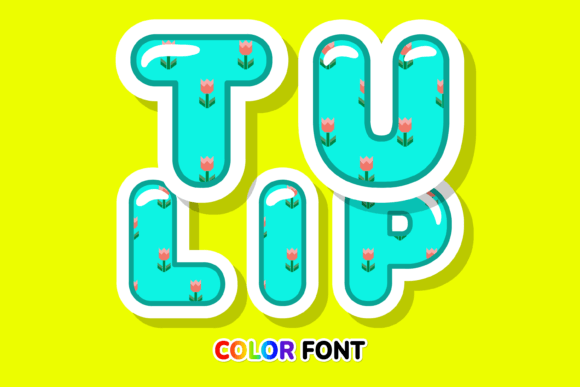
There's something undeniably joyful about a field of tulips in full bloom—their clean lines, vibrant petals, and elegant simplicity have inspired artists for centuries. Now, that same fresh, colorful energy has been captured in a typeface. Tulip isn't just another script font; it's a modern color font designed to bring a burst of creativity to your projects. As an OpenType-SVG font, it renders with multi-color gradients and textures directly in the letterforms, offering a level of visual depth that traditional monochrome fonts simply can't match.
Where This Creative Font Truly Shines
Think about the last time a piece of design made you stop scrolling. Often, it's the typography that carries the personality. Tulip excels as a display font, perfect for headlines, logos, and any place where you want to make an immediate, memorable impression. Its style bridges the gap between a playful handwritten font and a more structured modern typeface, making it surprisingly versatile.
For small business owners and entrepreneurs, this font can be a secret weapon for brand identity. Imagine it on product packaging for a boutique candle line or a skincare brand—the colorful, floral aesthetic communicates care, quality, and a touch of whimsy. It’s equally at home on social media graphics, instantly making Instagram stories or Pinterest pins more eye-catching. In the realm of editorial design, a pull quote set in Tulip can break up text-heavy layouts and draw the reader's eye to key ideas.
Practical Magic: Pairing and Readability
Using a strong display font like Tulip effectively requires a thoughtful approach to font pairing. Its detailed, colorful nature means it works best when paired with a clean, neutral companion. Consider using a simple sans serif font for body text to ensure readability and let Tulip be the star of headlines. A classic serif font could also provide an elegant contrast for a more sophisticated project. The key is balance; you want the Tulip typeface to enhance your message, not overwhelm it.
Always test your pairings in context. How does the headline look above a paragraph of text? Does the color font remain clear at the size you'll be using? While Tulip is designed for impact, it's wise to reserve it for larger applications where its intricate details can be appreciated. For smaller text, a more traditional premium font in your chosen style—whether a serif or sans serif—will maintain professionalism and clarity.
From Digital Screens to Physical Products
The applications for a font like this extend far beyond the screen. It’s a fantastic asset for creating custom merchandise. Think of eye-catching designs for tote bags, t-shirts, or mugs that stand out in a crowded marketplace. For event planners and creatives, it can transform wedding invitations, birthday cards, and party decorations into bespoke keepsakes. The font's inherent charm adds a personal, crafted feel that generic typefaces lack.
When working on digital products like PDF guides, worksheets, or online course materials, incorporating Tulip in section headers or title pages can elevate the perceived value and make the content feel more polished and engaging. It’s a subtle touch that contributes significantly to a professional presentation.
A Note on Compatibility and Creative Freedom
It's important to understand the technical side to unlock the full potential of this design asset. Tulip is delivered as an OpenType-SVG color font. This means it is fully compatible with professional design software like Adobe Photoshop, Adobe Illustrator, Silhouette Studio, and Inkscape. The vibrant, multi-colored appearance is preserved in these applications.
However, it's crucial to note that the standard OTF and TTF files included are not compatible with Cricut machines. For crafters using Cricut, you would need to use the font as a graphic element within a compatible design program first. Always review the licensing for any commercial font to ensure it fits your project's needs, whether for personal creations or client work. Checking the detailed font guide provided with the product is the best way to understand all its capabilities and limitations, ensuring you can use it confidently from the start.
Ultimately, choosing a typeface is about finding a voice for your project. Tulip offers a voice that is fresh, creative, and full of personality. It’s more than just letters on a page; it’s a design statement that can help your work bloom with originality.